ADVANCED DIGITAL INFORMATION CORPORATION
FASTSTOR DLT 7000
|
Device Type |
External Tape Drive |
|
Interface |
SCSI-2 |
|
Format |
DLT |
|
Sustained Transfer Rate |
10 MBPS |
|
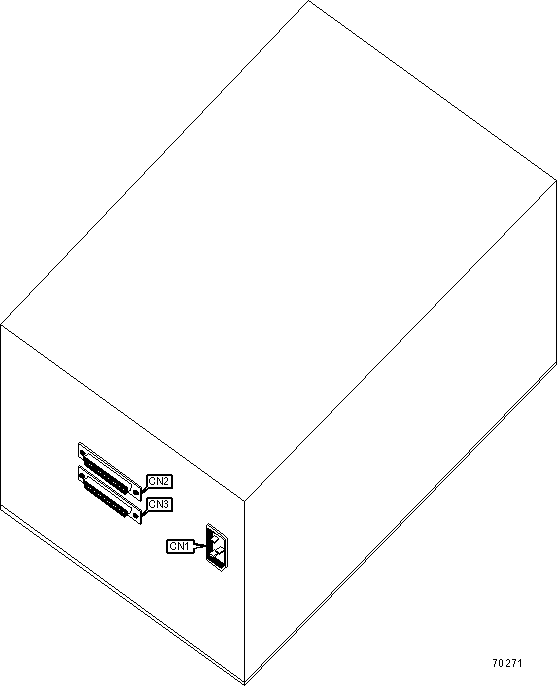
View |
Top |
|
CONNECTIONS |
|||
|
Function |
Label |
Function |
Label |
|
AC power connector |
CN1 |
SCSI-2 connector |
CN3 |
|
SCSI-2 connector |
CN2 |
||
|
MANUFACTURERS RECOMMENDED MEDIA |
||
|
Tape |
Capacity Without Compression |
Capacity With Compression |
|
DLTtape III |
140MB |
20GB |
|
DLTtape IIIXT |
210MB |
30GB |
|
DLTtape IV |
490MB |
70GB |
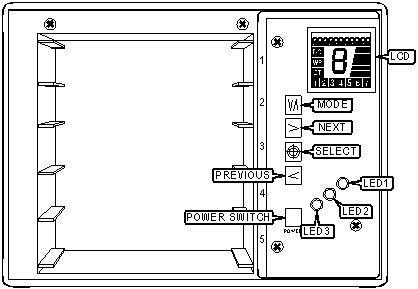
INSIDE FRONT DOOR
|
DIAGNOSTIC LED(S) |
|||
|
LED |
Color |
Status |
Condition |
|
LED1 |
Red |
On |
Error has occurred |
|
LED1 |
Red |
Off |
Normal operation |
|
LED2 |
Amber |
Blinking (slow) |
Robotic activity; unit is changing tapes |
|
LED2 |
Amber |
Blinking (fast) |
Data activity on drive |
|
LED2 |
Amber |
Off |
No activity on drive |
|
LED3 |
Green |
Off |
Power is off |
|
LED3 |
Green |
On |
Power is on |
|
DIAGNOSTIC LCD |
|||
|
Item |
Location |
Status |
Condition |
|
Activity bars |
Right side |
Blinking |
No activity |
|
Activity bars |
Right side |
Slow |
Cartridges are being moved from slots to drive |
|
Activity bars |
Right side |
Fast |
Data is being transferred to/from drive |
|
Numeric fields |
Bottom |
On |
Number appears when cartridge is present in slot |
|
DC |
Left side |
On |
Data compression is selected |
|
WP |
Left side |
On |
Write-protected cartridge has been loaded into drive |
|
CT |
Left side |
On |
Drive head needs to be cleaned |
|
Number |
Center |
On |
Indicates which cartridge is currently in drive |
|
On-line message |
Top |
Text display |
Displays status, error and menu messages |
|
On-line message |
Top |
"LDR INIT" |
Unit is being initialized |
|
On-line message |
Top |
"DRV INIT" |
Drive is being initialized |
|
On-line message |
Top |
"LDR READY" |
Unit is powered and ready |
|
Note: Insert and remove media from slots only when on-line message displays "LDR READY" |
|||
|
MENU KEYPAD |
|
|
Button |
Function |
|
Mode |
Enters or exits the unit's off-line mode menus |
|
Next |
Moves to the next item displayed on the LCD menu |
|
Select |
Executes current item displayed on the LCD menu |
|
Previous |
Moves to the previous item displayed on the LCD menu |
|
Power Switch |
Press and release to turn unit on. Press and hold for two seconds to turn unit off. |