COMPAQ COMPUTER CORPORATION
15/30-GB DLT (EXTERNAL)
| Device Type | External Tape Drive |
| Interface | SCSI-2 Fast |
| Format | DLT |
| Sustained Transfer Rate | 1.25 MBPS |
| Size | 5.25 in. full height |
| View | Top |
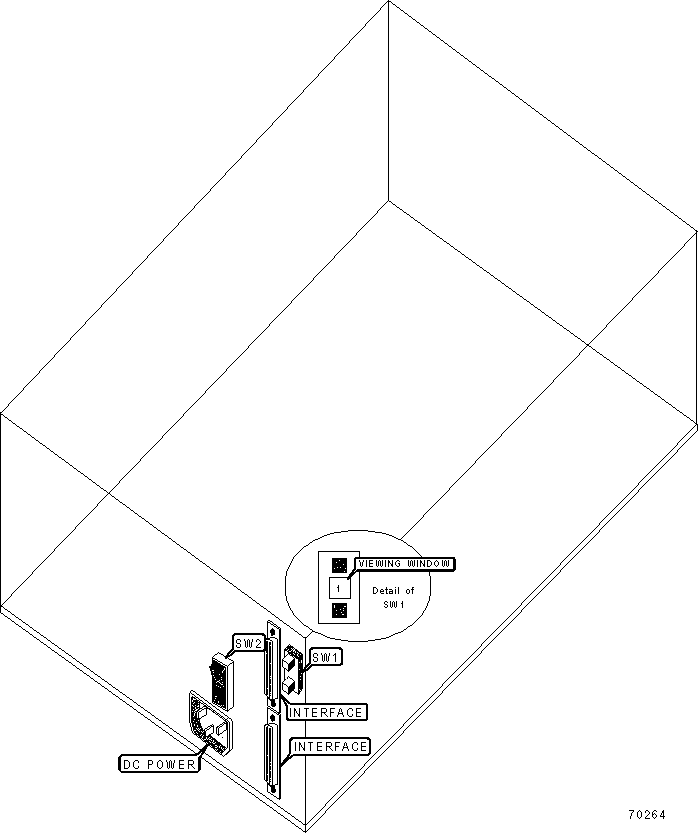
CONNECTIONS |
|
Function |
Label |
| Power switch | SW2 |
DRIVE SELECT ID |
| Note: SW1 selects SCSI ID 0 - 6. |
| MANUFACTURERS RECOMMENDED MEDIA | ||
Tape |
Capacity Without Compression |
Capacity With Compression |
DLT tape III |
10GB |
20GB |
DLT tape IIIxt |
15GB |
30GB |
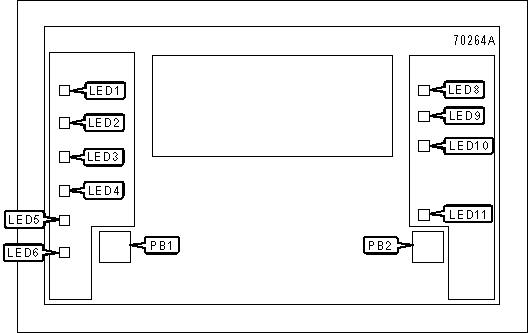
DIAGNOSTIC LEDS |
|||
LED |
Color |
Status |
Condition |
LED1 |
Yellow |
On |
Indicates tape is recorded in 2.6GB format |
LED1 |
Yellow |
Blinking |
Indicates tape is recorded in another density |
LED2 |
Yellow |
On |
Indicates tape is recorded in 6.0GB format |
LED2 |
Yellow |
Blinking |
Indicates tape is recorded in another density |
LED3 |
Yellow |
On |
Indicates tape is recorded in 10.0GB format |
LED3 |
Yellow |
Blinking |
Indicates tape is recorded in another density |
LED4 |
Yellow |
On |
Indicates tape is recorded in 15.0GB format |
LED4 |
Yellow |
Blinking |
Indicates tape is recorded in another density |
LED5 |
Yellow |
On |
Compression mode enabled |
LED5 |
Yellow |
Off |
Compression mode disabled |
LED6 |
Yellow |
On |
Density from front panel selected |
LED6 |
Yellow |
Blinking |
Density selection mode established |
LED6 |
Yellow |
Off |
Density mode host selected |
LED7 |
Orange |
On |
Cartridge is write-protected |
LED7 |
Orange |
Off |
Cartridge is write-enabled |
LED8 |
Yellow |
Blinking |
Cartridge is loaded and tape is moving. |
LED8 |
Yellow |
Off |
Cartridge is loaded and ready for use. |
LED9 |
Yellow |
On |
Drive head requires cleaning, or tape is bad. |
LED9 |
Yellow |
Off |
No cleaning is required |
LED10 |
Green |
On |
Ability to operate cartridge insert/release handle |
LED10 |
Green |
Blinking |
No tape insertion while running POST |
LED10 |
Green |
Off |
Do not operate cartridge insert/release handle |
| Note: All four right side or all seven left side indicators ‘On’ designates that the Power-on self-test (POST) is starting. All four right side or all seven left side indicators ‘Blinking’ designates that an error has occurred in the POST; clear the error by pressing the unload button, or turn drive power off and then on again. If error remains, service is required. | |||